Overview
This procedure outlines the requirements for handling collection accounts and determining when an account should be forwarded to Oxygen.
Accounts must meet age, balance, and outreach requirements before transfer.
Outreach Requirement
- Make three contact attempts (call, SMS, and email).
- Allow 7 business days for merchant response.
- Document all outreach attempts in the Collection Ticket.
If the merchant remains non-responsive, proceed according to the Collection Status Rules below.
Collection Status Rules
Over 60 Days & Under $100
- Do NOT send to Oxygen.
- Close the Collection Ticket.
- This includes balances related to chargeback fees and ACH rejects.
Ticket Note to Add:
Merchant is not responsive – Closing Collection Ticket. Unable to send to Oxygen because collection balance is under $100.
Additional Requirement:
- If the merchant has not processed in over 30 days:
- Submit a Close MID Ticket.
- Complete the Close MID procedure.
Over 60 Days & Over $100
- These accounts must be submitted to Oxygen.
- Confirm all outreach attempts were completed.
- Confirm ISO approval if required (see ISO Confirmation section).
- Ensure total outstanding balance exceeds $100.
Moving the Account to Oxygen
Navigate in CRM:
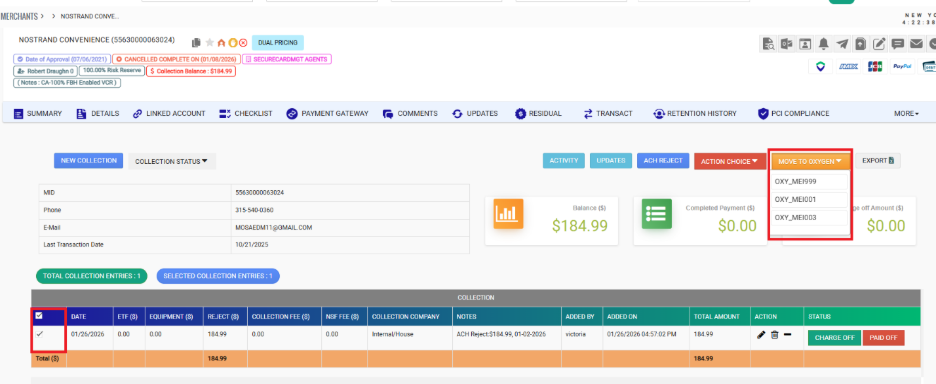
Merchant → Collection → Internal Collection → Move to Oxygen
Select the appropriate Collection Code:
| Processor | Code |
|---|---|
| MI/7524 | MEI999 |
| TSYS/9261 & 5563 | MEI003 |
| Promotex/5845 | MEI004 |
Click Move to Oxygen.
Click to view Screenshot – Move to Oxygen Button
Click to view Screenshot – Submission Confirmation
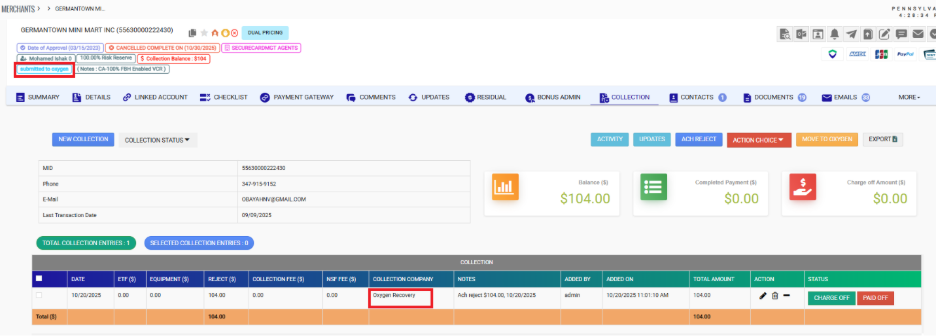
After verification:
- Click Collection again.
- Click Move to Oxygen a second time to finalize the transfer.
The transfer must be completed twice to properly submit to Oxygen.
Required Documents
- Upload the following under Upload Documents:
- Merchant Processing Agreement (MPA)
- Invoice
Once documents are uploaded and transfer is complete, close the Collection Ticket.
If Documents Cannot Be Uploaded
Email Oxygen directly with the MPA and Invoice attached.
Click to view Email Template
Subject:
Merchant Business Name {MID} – Documents & Fees
Email Body:
Hello,
The collection amount of $_____ is for an ACH reject related to _____ fees.
Please review the attached documents for [Merchant Name].
Thank you.
After emailing, close the Collection Ticket.
Merchant Pays After Transfer to Oxygen
- Confirm payment is fully settled in MI’s system.
- Ensure ISO is charged in the books.
- Document payment details in the Collection Ticket.
- Email Oxygen requesting account removal.
Send notification to:
- mharmse@oxygenxl.com
- smarais@oxygenxl.com
- clientservices@oxygenxl.com
Include:
- Merchant MID
- Payment confirmation details
ISO Confirmation Requirement
Before sending accounts from the following ISOs, confirm they are charging their books:
- Direct Sales FL & NYC
- Mecca
- Act Merchant Corp [3978]
- Promotex
- Youseff / Mazen Alghaberi (Merchant World) – Secure Card Management
- Hopping Group (Joseph Ferragamo & Raquel Dambrosi)
- NEP
ISO confirmation must be documented in the Collection Ticket prior to transfer.
Was this article helpful?
That’s Great!
Thank you for your feedback
Sorry! We couldn't be helpful
Thank you for your feedback
Feedback sent
We appreciate your effort and will try to fix the article