Deployment & Clover:
Prologue: For this RFC, to provide a new terminal from MI to the merchant.
Clover RFC have some additional to do list :
Followup process:
1. After the terminal is received by the merchant or ISO, we have to start the follow up process. It should be done the next day after the terminal is received by them.
Case(i): Call the merchant and ask whether they received the terminal or not. If yes, then confirm when they will start the processing terminal.
Case(ii): If the merchant doesn't pick up the call then call ISO and confirm when the merchant will start the process. If the ISO is an RG office emailed to Andrea for processing.
Case(iii): If the merchant and ISO do not pick up the call then emailed to the merchant and ISO for processing.
2. If the merchant started the process we closed this ticket with the proper solution.
3. If the merchant has not started the process or no response for the 3 days of follow up. Then, we emailed the tech,merchant and ISO to close the ticket.
Approved verbiage(Email followup) for deployment & Clover: Keary
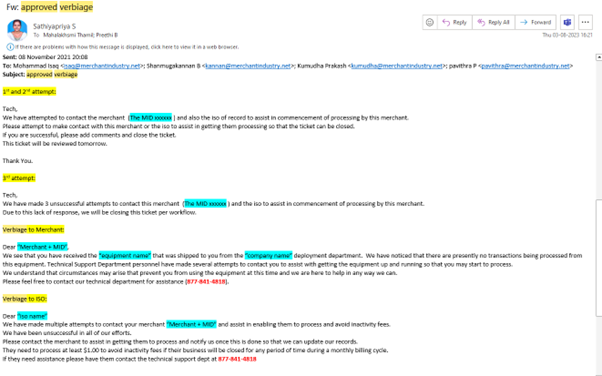
Verbiage to Merchant:
Subject: Merchant + MID
TO: Merchant only
Hi, “Merchant + MID”,
We see that you have received the “equipment name” that was shipped to you from the “company name” deployment department. We have noticed that there are presently no transactions being processed from this equipment. Technical Support Department personnel have made several attempts to contact you to assist with getting the equipment up and running so that you may start to process.
We understand that circumstances may arise that prevent you from using the equipment at this time and we are here to help in any way we can.
Please feel free to contact our technical department for assistance (877-841-4818).
Verbiage to ISO:
Subject: Merchant +MID
To: ISO only
Cc: India Tech , NY Tech
Hi “iso name”
We have made multiple attempts to contact your merchant “Merchant + MID” and assist in enabling them to process and avoid inactivity fees.We have been unsuccessful in all of our efforts. Please contact the merchant to assist in getting them to process and notify us once this is done so that we can update our records.They need to process at least $1.00 to avoid inactivity fees if their business will be closed for any period of time during a monthly billing cycle.If they need assistance please have them contact the technical support dept at 877-841-4818
1st and 2nd attempt:
Tech,
We have attempted to contact the merchant (The MID xxxxxx ) and also the iso of record to assist in commencement of processing by this merchant. Please attempt to make contact with this merchant or the iso to assist in getting them processed so that the ticket can be closed.If you are successful, please add comments and close the ticket.This ticket will be reviewed tomorrow.
3rd attempt:
Tech,
We have made 3 unsuccessful attempts to contact this merchant (The MID xxxxxx ) and the iso to assist in commencement of processing by this merchant. Due to this lack of response, we will be closing this ticket per workflow.
Invoice Creation:
Purpose of Invoice creation:
Our primary objective is to boost the number of invoices from India. For this purpose, Greg, Frank, and Priyanka are tasked with providing a process for generating invoices specifically for India, as per New York's request. These instructions will be posted within the "India Invoices Group."
In the event of a request, it is crucial for the India team to respond promptly and prioritise their response, as there may be ISOs waiting for terminals at the NY office.
Google Sheet: Invoice Creation.
Workflow:
If the NY team provided the Terminal S.N → we need to make the Invoice as per request.
Invoicing can be for the Merchant or ISO.
Deployment fees may be included or not.
Shipment destination options: Merchant or ISO address. (Notes: If they mentioned the requests only)
======================================================================
Was this article helpful?
That’s Great!
Thank you for your feedback
Sorry! We couldn't be helpful
Thank you for your feedback
Feedback sent
We appreciate your effort and will try to fix the article